
How to Add Virtual Try-On to a Shopify Jewelry Store
How to Add Virtual Try-On to a Shopify Jewelry Store is becoming a common search for jewelry brands that want to improve customer confidence and increase conversions directly on product pages. Shopify store owners often struggle because jewelry shoppers cannot physically test rings, earrings, or necklaces before purchase, which creates hesitation during checkout. Virtual try-on solves this problem by allowing customers to see jewelry products on themselves through augmented reality using a smartphone camera. For jewelry ecommerce brands, adding this feature helps create a stronger product experience and supports better engagement without changing the full Shopify store structure.
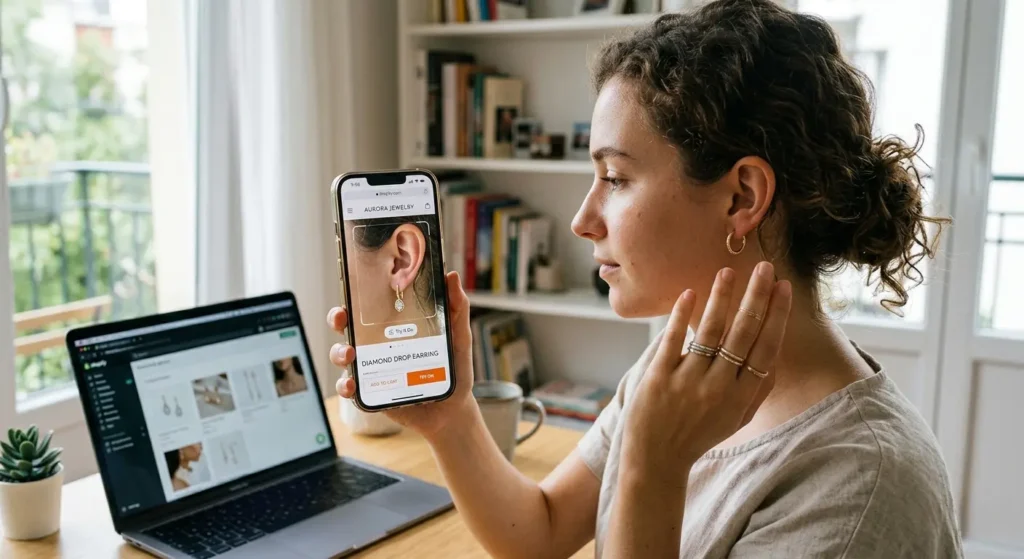
Why Jewelry Brands Search for How to Add Virtual Try-On to a Shopify Jewelry Store
Many jewelry brands invest heavily in traffic through ads, influencer campaigns, and organic search, but conversions often slow down because product pages still leave important visual questions unanswered. Customers may like a ring or earring design but still hesitate because they cannot understand how it will look when worn. This hesitation becomes stronger in premium jewelry categories where design appearance strongly influences buying decisions.
That is why many store owners now search for How to Add Virtual Try-On to a Shopify Jewelry Store before scaling their online business. The goal is simple: improve confidence directly inside the product page so customers feel more certain before moving toward checkout.
Step 1: Select the Right Jewelry Products First
The best way to start is by choosing products where visual hesitation is highest. Not every product needs virtual try-on in the first stage. Jewelry brands usually begin with products that already receive strong traffic and where product appearance directly affects conversion.
Good starting categories include:
- Engagement rings
- Solitaire rings
- Hoop earrings
- Statement earrings
- Premium necklaces
These products often generate the strongest visual decision-making, making AR highly effective.
Step 2: Prepare Product Visual Accuracy
Before adding AR, product details must be visually accurate because jewelry buyers notice even small design differences. Ring size appearance, stone shape, metal color, and product proportions should match the real product carefully.
A strong virtual try-on experience depends on product realism because customer trust can drop quickly if the digital product looks different from the actual item. Accurate preparation improves confidence and helps the feature feel useful rather than decorative.
Step 3: Place Virtual Try-On Inside the Product Page
When brands ask How to Add Virtual Try-On to a Shopify Jewelry Store, placement inside the product page becomes one of the most important decisions. The try-on button should appear near product images or close to the buy section where customer attention is naturally focused.
If the feature is difficult to find, fewer customers will use it. A visible and clear placement improves interaction because shoppers notice it while already evaluating the product.
Step 4: Keep Mobile Experience as the Priority
Most Shopify jewelry traffic now comes from mobile users, so virtual try-on must feel easy on smartphones. Customers usually discover jewelry through mobile ads, Instagram, or search results and move directly into product pages.
Because mobile devices already include cameras, virtual try-on works naturally in this environment. This is one reason why How to Add Virtual Try-On to a Shopify Jewelry Store often focuses heavily on mobile-first product experience.
Step 5: Start With a Small Product Launch
Instead of launching AR across the full catalog, many successful brands begin with a small test group. A focused launch helps measure how customers respond before expanding.
A strong pilot usually includes:
- 10 to 20 high-traffic products
- Premium bestsellers
- Products with higher hesitation before checkout
This approach makes performance easier to evaluate.
Step 6: Measure Product Page Engagement
After launch, the first goal is to understand whether customers actually interact with the feature. Early engagement often shows whether virtual try-on is improving product confidence.
Important signals include:
- Try-on button clicks
- Product page time
- Add-to-cart changes
- Mobile engagement patterns
- Product comparison behavior
These signals help Shopify brands understand if the feature supports buying decisions.
Why Virtual Try-On Improves Shopify Jewelry Conversion
Jewelry buying is highly emotional because appearance strongly affects confidence. Customers often compare products repeatedly before purchase, especially when buying premium items.
Virtual try-on improves conversion because it shortens the imagination gap. Instead of asking how a ring or earring may look, shoppers receive an immediate visual answer on their own hand or face.
Why Product Experience Matters More Than Extra Traffic
Many brands increase ad spend without improving product confidence. This often creates traffic growth without strong conversion improvement because hesitation still exists on the product page.
That is why How to Add Virtual Try-On to a Shopify Jewelry Store is becoming an important ecommerce strategy. It improves what happens after traffic arrives.
Final Thoughts
How to Add Virtual Try-On to a Shopify Jewelry Store is no longer only a technical question—it is now a conversion strategy for modern jewelry ecommerce. Brands that improve visual confidence often create stronger customer trust and better product interaction.
A focused launch with the right products, clear placement, and mobile-first execution can help Shopify jewelry stores improve product confidence quickly.
Frequently Asked Questions of How to Add Virtual Try-On to a Shopify Jewelry Store
1 How to add virtual try-on to a Shopify jewelry store?
Virtual try-on can be added directly to Shopify product pages so customers can use their mobile camera while browsing jewelry. This helps shoppers test products visually before moving to checkout.
2 Which jewelry products should start first?
Rings, earrings, and necklaces are usually the best starting products because customers often hesitate most in these categories. These products depend heavily on visual appearance before purchase.
3 Does virtual try-on improve conversion?
Yes, virtual try-on helps customers feel more confident because they can see how jewelry looks before buying. This often improves engagement and reduces hesitation on product pages.
4 Is virtual try-on better on mobile?
Yes, mobile gives the best experience because shoppers can instantly open the camera while viewing products. This makes the try-on process fast and natural during shopping.
5 How fast can Shopify stores launch virtual try-on?
Many stores begin by testing virtual try-on on selected products first instead of the full catalog. A focused launch helps measure customer response before wider expansion.